Read the map as text
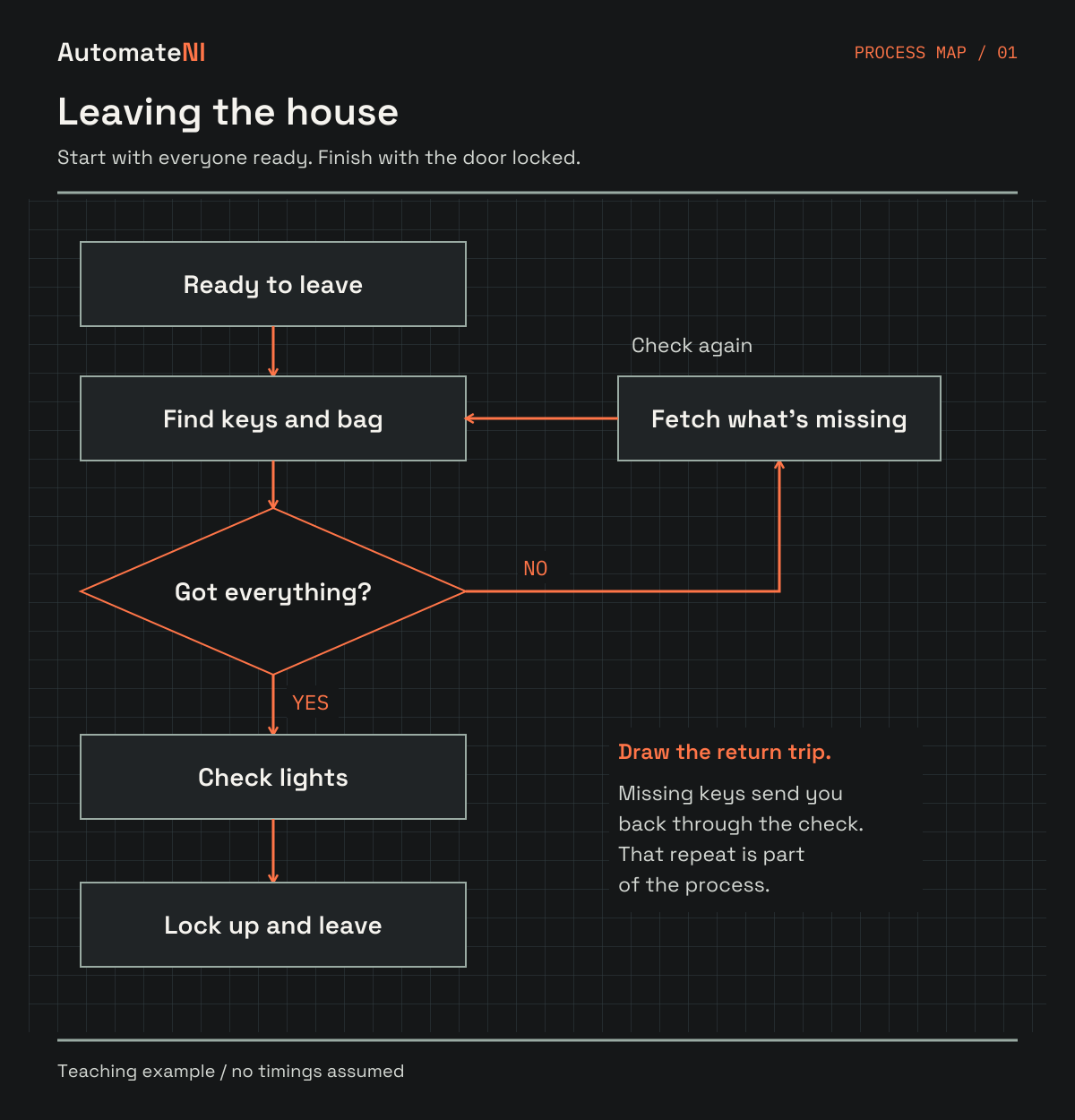
- Start when everyone is ready to leave. Find the keys and bag.
- Ask: have you got everything? If no, fetch what is missing, return to the keys-and-bag step and check again.
- If yes, check the lights, then lock up and leave. Finish when the door is locked.
- This is a teaching example, not a record of Callum’s routine. No timings are assumed.
If you're trying to find something useful to automate, I'd start with a sheet of paper. Write down a job you already do, then work out what actually happens between starting it and finishing it. That's a process map. It sounds almost too simple to bother with, which is probably why it's so easy to skip.
I'd encourage a junior developer to do this before hunting for a project idea. I'd give the same advice to a business owner wondering where the week goes, or an organiser trying to hand over a job. Your morning routine counts. So does sorting an equipment request, opening a venue or getting an order out the door. Pick something you can watch happening.
The useful moment is when you notice a step you've been doing on autopilot. Perhaps you're entering the same information twice. Perhaps the actual work takes ten minutes but nobody sees the request until tomorrow. Now you've got something specific to change, and a reason to write the code.
Give your map a start and a finish
'Make the business more efficient' is too big to put on a page. 'From receiving an equipment request to confirming a collection slot' is something you can follow. Those boundaries keep you from trying to document the entire organisation before lunch. Write down the result someone is waiting for, then choose the event that starts the work.
At home, you could map leaving the house in the morning. Does it start when the alarm goes off, or when everyone is ready and you're checking lights and doors? Either is fine, but they are different jobs. A tighter boundary makes it easier to understand which problem a button or sensor might solve.
Use the person doing the work as your starting point. If that's somebody else, sit with them and ask them to take you through a recent example. The process in a manager's head can be several workarounds behind the one people actually use.
The first map above keeps that morning job small. Find the keys and bag, check you've got everything, then check the lights and lock up. The no route sends you back to fetch whatever is missing. It's a made-up example, but that little loop is the sort of thing worth drawing: a job that looked like four steps now has a reason it sometimes takes longer.
Draw what happens now, including the annoying bits
Give each action a short label with a verb: read the request, check the cupboard, ask for a missing date. Connect the actions in the order they happen. Put a question where the path splits, and label the answers. 'Equipment available?' needs both a yes route and a no route.
A rectangle can stand for an action and a diamond for a decision. An arrow shows where the work goes next. ASQ's flowchart reference explains these common symbols. You don't need to learn a whole notation before trying your first map; a reader being able to follow it matters more than beautiful shapes.
Include the awkward route. If someone has to chase a missing detail, draw the trip back to the requester. If a hand-off involves copying a message into another tool, show that too. Leave the improved version for a second sheet. Otherwise it's very easy to draw the process you wish you had and miss the reason the current one is frustrating.
Write the owner beside each action. 'Check availability' means little if three people think one of the others checks it. For a home routine, an owner can be a person or a device, but be precise about what the device can actually observe.
Sources: ASQ: flowcharts and process maps.
A worked example: borrowing community equipment
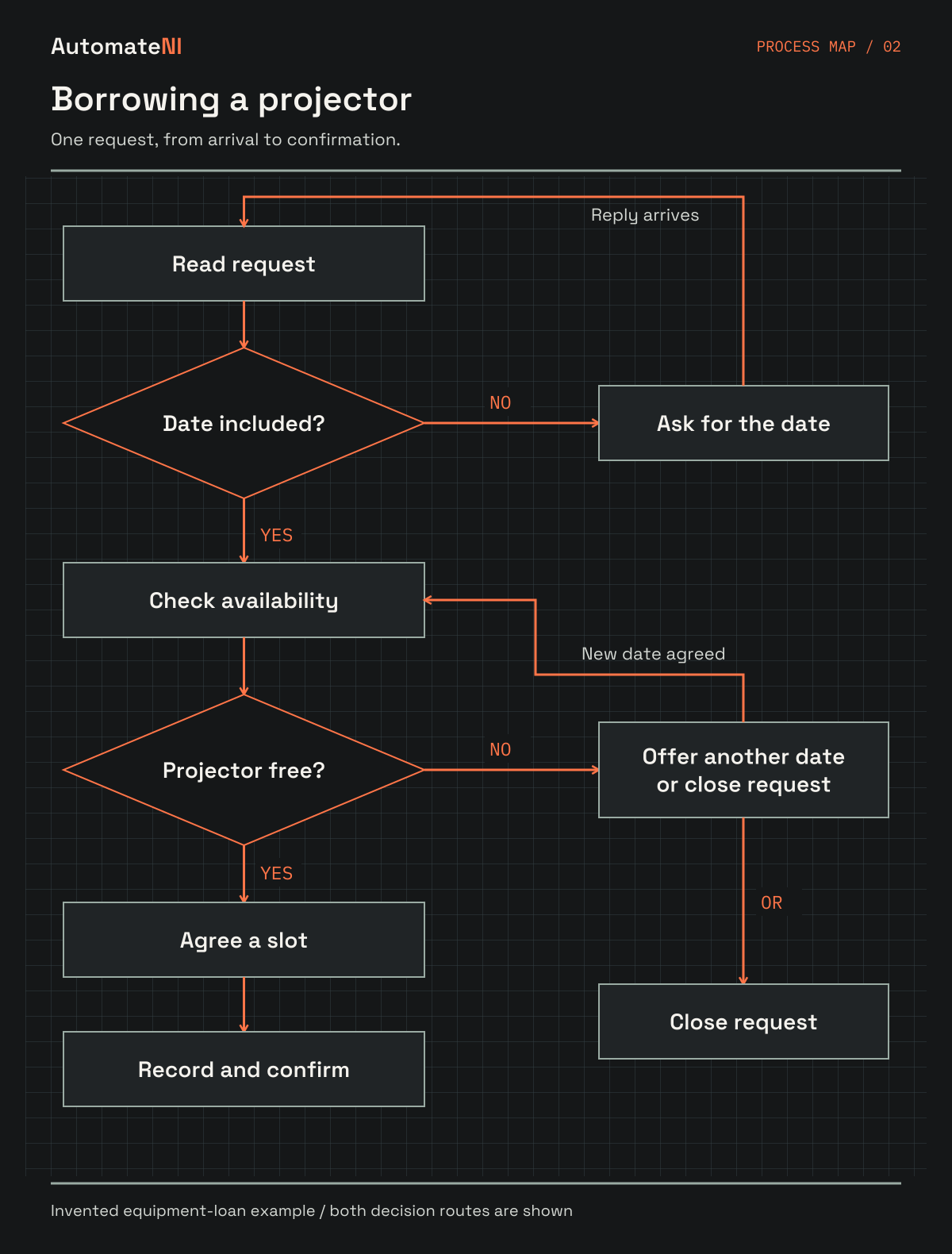
Let's use an invented equipment loan. A member asks to borrow a projector. A volunteer reads the request, checks whether it includes a collection date and looks at the booking record. If the projector is free, the volunteer agrees a slot, records the loan and sends confirmation. If it isn't, they offer another date or close the request.
The interesting bit is the missing collection date. The volunteer cannot check availability properly without it. Asking another person to write a faster booking script won't fix that missing input. A clear date field on the original request might be the better first change.
On the straightforward route, suppose reading takes two minutes, checking the booking record takes three, agreeing the slot takes four, recording the loan takes two and sending confirmation takes one. That's twelve minutes of active work. These are invented teaching numbers, not measurements from a real group.
Now add a forty-five-minute wait before the request is noticed and a thirty-minute wait for the member to confirm the slot. If those steps happen one after another, the elapsed time is eighty-seven minutes: twelve working and seventy-five waiting. Keep the incomplete-request route separate because it has another wait and another pass through the checks.
The PDF shows that route as a diagram and gives you a timing table to try yourself. Nobody needs a complicated dashboard to notice that making the confirmation email a little faster won't remove the longest wait.
Read the map as text
- Read the equipment request. Ask: does it include a collection date?
- If no, ask for the date. When the reply arrives, return to reading the request.
- If yes, check availability. Ask: is the projector free?
- If free, agree a slot, then record and confirm the loan.
- If unavailable, offer another date or close the request. A new date must go through the availability check again.
- This is the invented equipment-loan example discussed below, not a reported community process.
Look for repetition, but measure the waiting too
Beside each step, note roughly how long the person spends working on it. In a separate column, note how long it waits for attention, information or approval. Start with a few real examples and label estimates as estimates. One unusually quick run is a poor description of the normal job.
Record when a step happens again. If a request gets sent back twice, the original processing time doesn't tell the whole story. You may find that fixing the request form saves more effort than automating what happens after it arrives. You may also find that a review takes time because somebody is checking something that genuinely matters.
Don't add every branch together and call it the time for one request. Pick a route and measure that route. If two people work in parallel, their combined effort and the elapsed time will differ. Keep those ideas separate; it stops your estimate from promising a saving nobody will actually feel.
For a morning routine, the equivalent might be how long you're actively getting ready versus how long you're searching for something you forgot to put back. A better place for the keys could beat a notification system. You can still build the notification system for fun, but now you know what you're trying to learn.
Choose a small change you can actually test
Circle one repeatable step with a clear input and an outcome you can check. Copying a confirmed loan into a calendar is a more manageable first project than making a machine decide who is allowed to borrow equipment. Write down the rule in ordinary language before choosing Home Assistant, Python, n8n or anything else.
A first version might prepare a calendar entry for somebody to review. That still removes retyping. It also gives you a chance to catch the wrong date before it becomes a real booking. Keep the original way of doing the job available while you compare a few runs.
Ask what happens if the same request arrives twice, the date is missing or the calendar is unavailable. Give the failure a visible home and name the person who deals with it. 'The workflow failed' is not a helpful hand-over if nobody knows which request is now waiting.
Then count the maintenance. If you remove ten minutes a week but spend twenty checking whether it ran, the time-saving argument needs work. Learning might still make the project worthwhile. Be honest about that distinction, and use the calculator when you have figures worth putting into it.
The same map makes delegation much easier
This is the bit I'd push managers and business owners to do even if they never automate a thing. When you're handing a job over, show the new person where it fits from start to finish. They need to understand what arrived before their step and what somebody else needs afterwards.
Give them the map alongside one completed example and the instructions for the fiddly steps. A flowchart alone won't explain which account to use, how to judge an unusual request or who can approve an exception. Keep those instructions close to the relevant step instead of turning every box into a paragraph.
Ask the person learning the job to follow a normal example, then an awkward one. Where do they hesitate? Which arrow needs an explanation from you? That's useful feedback on the hand-over. Update the map while the gap is obvious, and put a name and review date on it so someone owns the next correction.
You don't need to pretend the process will stay fixed. The point is to give people a shared starting point that can change when the work changes. That's a much better use of a diagram than filing it away because the onboarding task has been ticked off.
Try one before buying another tool
Choose a job you've done this week. Write its start, its finish and the steps you remember. Then walk through a real example and correct the bits you missed. Add the waits and the people. By the end you should have a question small enough to investigate, even if the answer turns out to be changing the instructions rather than writing software.
If you're learning to code, that question gives you a project with something to test. If you're organising a group, it gives the next volunteer a way in. If you run a business, it gives you a much more useful conversation about time than 'we should probably automate more stuff'.
Bring the map to AutomateNI if you get stuck. A messy page and one specific problem are plenty to start with. I'd rather hear about the hand-off you couldn't explain than see another perfect diagram that nobody has tried to follow.
- Download the six-page process-mapping guide
- Print the separate one-page mapping canvas
- Get the date for Little Automations
Sources and further reading
- ASQ: flowcharts and process maps. Reference for common flowchart symbols and walking through a current process. The equipment example, timings and worksheets here are original teaching material, not reported results.
Pick one hand-off from your map and use the Workflow Planner to write its checks, owner and failure path.
Open the tools